 Upgravo
"Deprecated: Creation of dynamic property" in WordPress – what it means and how to fix it
This notice appears after your hosting moves to PHP 8.2 or newer. It is a warning, not an error: your site still works. But the plugin that triggers it is using a pattern PHP will remove in a future version, so it is a sign of code that has not been updated.
What the message looks like
Deprecated: Creation of dynamic property Some_Plugin::$settings is deprecated
in /wp-content/plugins/some-plugin/includes/class-main.php on line 80
The path after /wp-content/plugins/ tells you which plugin is responsible. If the path says /wp-content/themes/, it is your theme.
Why PHP 8.2 started complaining
Before PHP 8.2, a class could invent a property on the fly:
class Some_Plugin {
    public function __construct() {
        $this->settings = get_option( 'some_plugin_settings' ); // $settings was never declared
    }
}
PHP 8.2 deprecated this. The fix is one line in the plugin's code: declare the property.
class Some_Plugin {
    public $settings;
    public function __construct() {
        $this->settings = get_option( 'some_plugin_settings' );
    }
}
Since the fix is trivial, most maintained plugins shipped it during 2023-2024. If you still see the notice in 2026, the plugin is either unmaintained or you are running an old version.
Does it break anything?
Not today. A deprecation notice means "this still works, but will stop working in a future PHP version". PHP 9 is expected to turn it into an error. Until then the only real problems are:
- Visible warnings on your pages. This happens when
WP_DEBUG_DISPLAYis on, or the host'sdisplay_errorssetting is on. Turn them off on a live site. - A debug.log that grows by megabytes a day. Every page load writes the notice again.
- Broken AJAX or REST responses. If the notice is printed before a JSON response, the JSON becomes invalid and parts of the admin or checkout stop working. This is the one case where a "harmless" notice does real damage.
How to find the plugin responsible, manually
- Open
wp-content/debug.log(or your host's PHP error log). - Search for
Creation of dynamic property. - Each line names a file path. Group them by plugin folder.
- Update each plugin. Most notices disappear after the update.
- For plugins that still trigger it after updating, check the plugin's support forum on WordPress.org. If the last update is more than a year old and the author does not reply, plan a replacement.
This works, but you only find the plugins that happened to run while you were watching the log. A plugin that only runs at checkout, or on a monthly cron, will not show up until it fires.
How to check every installed plugin at once
Upgravo scans the code of all your installed plugins and themes against the PHP version you choose, without running them. For PHP 8.2 it lists every file and line that creates a dynamic property, grouped by plugin, so you see the full list before upgrading instead of discovering it in the log afterwards.
Install it from WordPress.org: Upgravo – PHP Compatibility Check. The scan runs on your own server; no code is sent anywhere.
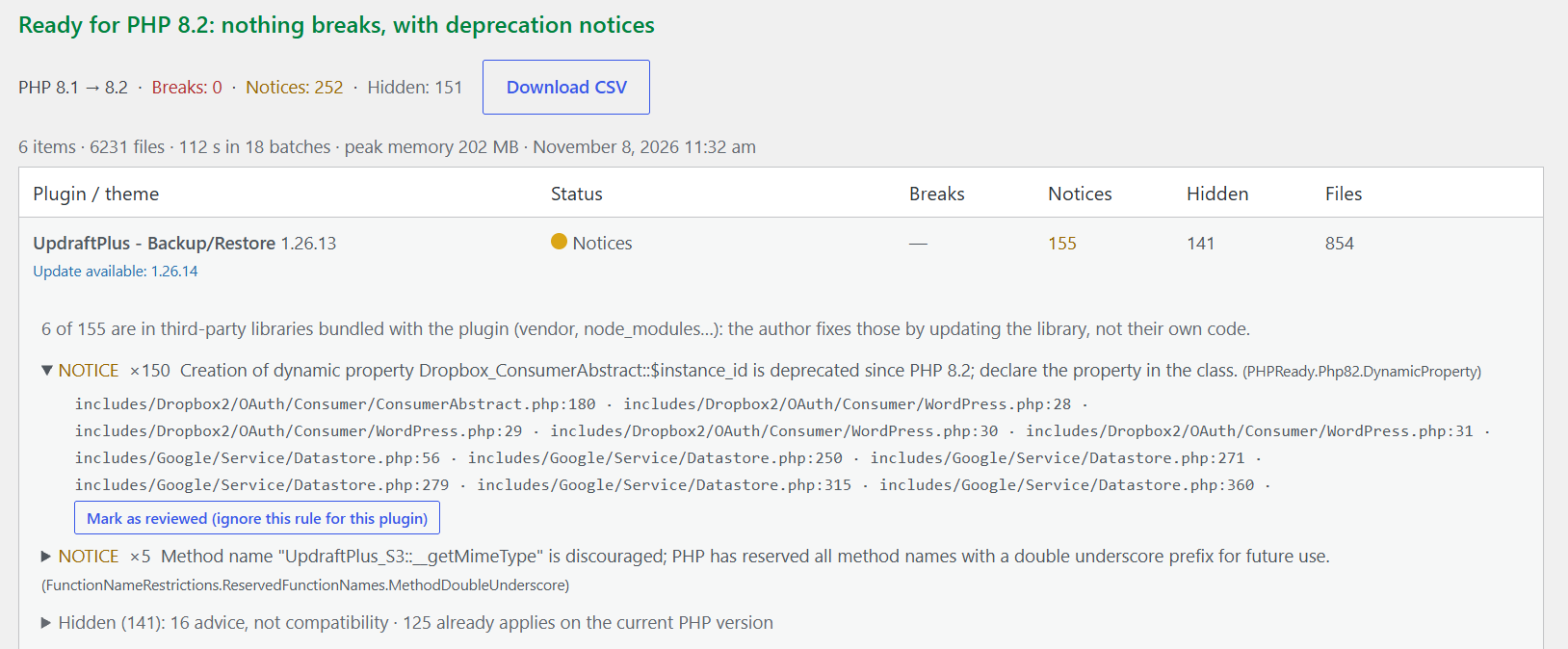
What it does not catch: properties set through a variable name ($this->{$name}), code inside eval(), and classes whose parent Upgravo cannot find. An unknown parent means it stays silent rather than guessing.
If the plugin author won't fix it
- Temporary silence: add
#[AllowDynamicProperties]above the class declaration in the plugin file. It works, but the next plugin update overwrites your change. - Hide notices on the live site (not a fix): in
wp-config.php, setWP_DEBUG_DISPLAYtofalseand make sureWP_DEBUG_LOGistrue, so notices go to the log instead of the page. - Replace the plugin. If a plugin has not been updated since PHP 8.2 came out (December 2022), it has missed three PHP versions. The notice is the least of its problems.
Sources
- PHP 8.2 migration guide, deprecated features
- php.watch: Dynamic properties are deprecated
- WordPress.org support threads for Jetpack, New User Approve and ACF Font Awesome, 2023-2024
More guides
- "Implicitly marking parameter as nullable is deprecated" – PHP 8.4 and WordPress plugins
- "Uncaught TypeError: … must be of type …" – why PHP 8 turns old warnings into fatal errors
- "There has been a critical error on this website" after a PHP update
- PHP Compatibility Checker is abandoned – what to use instead
- WordPress debug.log full of "Deprecated" notices – should you worry?
- My host forced a PHP upgrade and broke my WordPress site
- How to check if your WordPress plugins are compatible with PHP 8.3 or 8.4 before upgrading
- PHP 7.4 is end of life: what breaks in WordPress when you move to PHP 8