 Upgravo
"Implicitly marking parameter as nullable is deprecated" – PHP 8.4 and WordPress plugins
This notice appears after your host moves to PHP 8.4. It is a deprecation warning, not a fatal error: the site keeps working. It is also the most common notice of the PHP 8.4 cycle, because the pattern it flags was normal PHP for fifteen years and almost every plugin written before 2024 contains it.
What the message looks like
Deprecated: Some_Plugin::load(): Implicitly marking parameter $args as nullable
is deprecated, the explicit nullable type must be used instead
in /wp-content/plugins/some-plugin/includes/class-loader.php on line 42
The path after /wp-content/plugins/ names the plugin. One plugin can produce dozens of these at once, one per function, so a debug.log can grow by megabytes a day.
Why PHP 8.4 started complaining
Before PHP 8.4, giving a typed parameter a default of null made it nullable automatically:
function load( array $args = null ) { … } // $args may be an array or null
PHP 8.4 deprecates that shortcut. The type must say so explicitly:
function load( ?array $args = null ) { … } // one character added
The fix is mechanical and PHP tools do it automatically, so maintained plugins shipped it during 2024-2025. If you still see the notice in 2026, the plugin (or a library it bundles) has not been updated for PHP 8.4.
Does it break anything?
Not on PHP 8.4. The notice is a promise that a future PHP version will refuse the old form; nothing has broken yet. The real problems are side effects:
- Output before headers. If
display_errorsis on, the notice is printed into the page. On an AJAX or REST call it corrupts the JSON and a feature silently stops working: an editor that does not load, a checkout button that does nothing. This is the usual way a "harmless" deprecation turns into a support ticket. - Log growth. With
WP_DEBUG_LOGon, every request writes every notice again. - Masking. Hundreds of nullable notices bury the one line that matters, such as a real fatal error from another plugin.
How to find the plugin responsible, manually
- Open
wp-content/debug.logor the host's PHP error log. - Search for
Implicitly marking parameter. - Group the lines by plugin folder. Expect a handful of plugins to account for most of them.
- Update those plugins. Check their changelog for "PHP 8.4".
- For a plugin still producing the notice after updating, open its support forum on WordPress.org. If the last release predates PHP 8.4 (November 2024) and the author is silent, plan a replacement.
The limit of this method: the log only shows code that ran while you were watching. A function used only at checkout, or by a weekly cron, will not appear until it fires.
How to check every plugin before switching to PHP 8.4
Upgravo reads the code of all installed plugins and themes and checks it against the PHP version you select, without running anything. Set the target to 8.4 and it lists every function with an implicitly nullable parameter, by plugin, file and line, before you change the host's PHP version.
Install it from WordPress.org: Upgravo – PHP Compatibility Check. The scan runs on your own server; no code is sent anywhere.
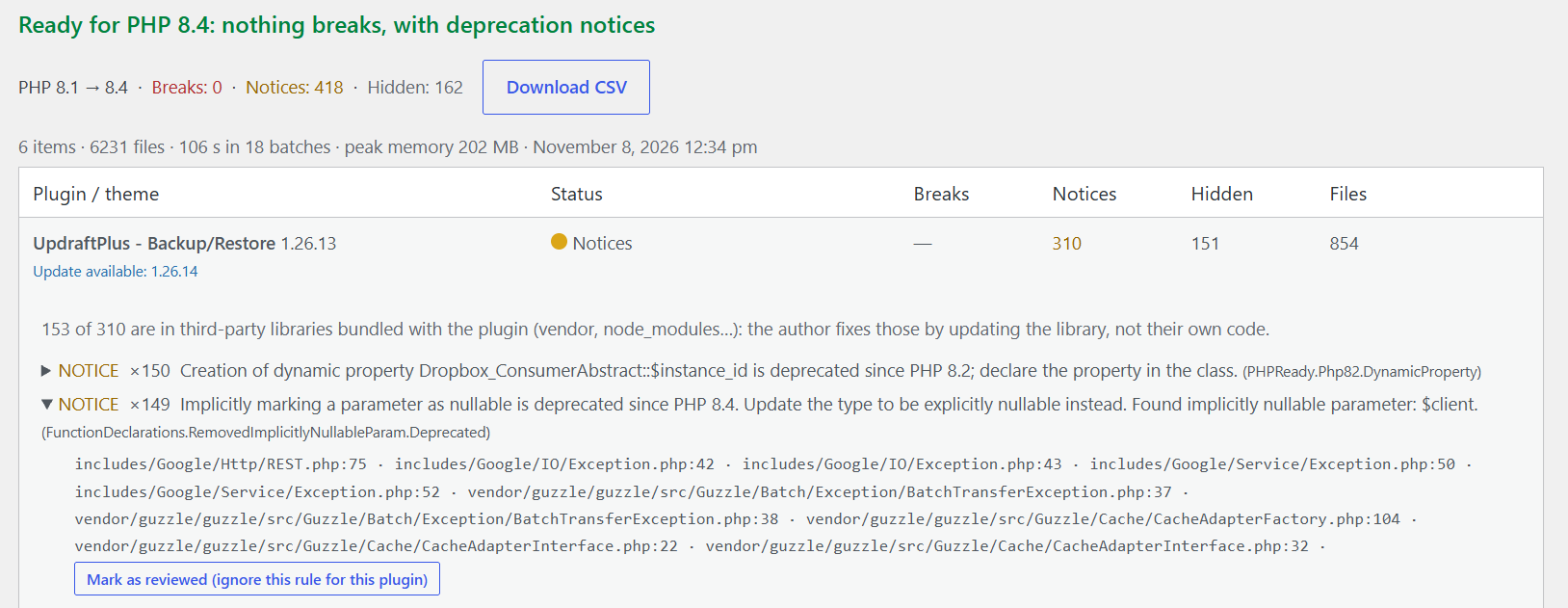
What it does not catch: code generated at runtime (eval(), create_function()), and anything inside files too large to analyze on your hosting's memory limit, which the report lists as skipped.
Other PHP 8.4 notices you will see next to this one
The constant "CURLOPT_BINARYTRANSFER" is deprecatedandE_STRICT: removed constants.Function mysqli_ping() is deprecated: removed function.Passing E_USER_ERROR to trigger_error() is deprecated: the old way of raising a fatal error.The $escape parameter must be passed when calling fgetcsv(): CSV functions now require it.
All four are deprecations, not fatals, and all four are typical of plugins last updated before 2025.
If the plugin author won't fix it
- Hide notices on the live site (not a fix): in
wp-config.php,WP_DEBUG_DISPLAYtofalseandWP_DEBUG_LOGtotrue. Notices go to the log, not the page. - Stay on PHP 8.3 for that site until the plugin is updated. PHP 8.3 receives security fixes until December 2027, so there is no rush.
- Patch locally only as a last resort: add
?before the type in the flagged declarations. The next plugin update overwrites it. - Replace the plugin if it has had no release since PHP 8.4 came out. The nullable notice is a symptom; the cause is an unmaintained plugin.
Sources
- PHP RFC: Deprecate implicitly nullable parameter types
- php.watch: Implicitly nullable parameter declarations deprecated
- PHP supported versions
- Support threads: My Calendar, WPML, Admin Columns, 2025-2026
More guides
- "Deprecated: Creation of dynamic property" in WordPress – what it means and how to fix it
- "Uncaught TypeError: … must be of type …" – why PHP 8 turns old warnings into fatal errors
- "There has been a critical error on this website" after a PHP update
- PHP Compatibility Checker is abandoned – what to use instead
- WordPress debug.log full of "Deprecated" notices – should you worry?
- My host forced a PHP upgrade and broke my WordPress site
- How to check if your WordPress plugins are compatible with PHP 8.3 or 8.4 before upgrading
- PHP 7.4 is end of life: what breaks in WordPress when you move to PHP 8